ALCHEMIST WEB
Your media never leaves your machine.
Alchemist Web is a full edit suite that runs in a browser tab — and reads your footage straight off the disk it is already on. No upload queue, no proxy farm, no copy of your rushes sitting on somebody else's server.
Nothing uploads · nothing transcodes in the cloud · no account needed to start cutting
BUILT ON THE PLATFORM
File System Accessa handle, not a copy
WebCodecshardware decode
WebGPUgrading and scopes
OPFSprivate cache
WebAssemblythe real OTIO core
LOCAL FIRST
The browser asks for a handle. Not a copy.
Every other browser editor begins by asking you to upload. This one begins by asking the operating system for permission to read the folder you already have.
Stays on your machine
Your camera originals
Read in place through a file-system handle. The bytes are pulled on demand and never copied anywhere first.
Every decoded frame
GOP segments and still previews cache in private per-origin storage that only this origin can read.
Your sequences and projects
Written to local storage and bundled into a portable .alcm archive you keep.
Grades, LUTs and scopes
Computed on your own GPU through WebGPU, frame by frame, as you scrub.
Your exported master
Muxed in the tab and streamed straight into the file you picked.
Leaves only if you ask
Frame.io media
Only when you connect an account. Renditions come browser-to-S3 with no server of ours in the middle, then cache locally.
A live review session
Only when you host or join one. That is Alchemist Review, and it is a deliberate act.
The application itself
Downloaded once, then served from a service-worker cache. After that first load the editor opens offline.
THE PLATFORM
Not a video player with buttons on it.
The browser grew real media primitives. Alchemist Web is built directly on them rather than shipping frames from a server and calling it an editor.
BROWSER API | WHAT IT DOES | HOW IT IS USED |
|---|---|---|
WebCodecs | Hardware decode | H.264, HEVC and AV1 run on the browser's own decoders through a frame-window player. ProRes and DNx arrive via software decoders that share the same sample-sink presentation path. |
WebGPU | Colour and analysis | The IPP2 3D-LUT output transform plus waveform, parade, histogram and vectorscope, all on one shared device. Scopes sample the post-LUT texture directly, with no canvas round-trip. |
File System Access | Your actual files | Real handles to media on your disk, from a picker or a drag-drop. Handles persist between visits and are re-permissioned rather than re-uploaded. |
OPFS | Private local cache | Per-origin storage the app owns: decoded GOP segments, still-preview JPEGs, sequences and cached remote proxies, all under an LRU budget. |
WebAssembly | The real OTIO core | OpenTimelineIO's actual C++ core compiled to WASM — about 560 KB — so interchange uses the reference implementation instead of a re-write of the format in TypeScript. |
NOTE
Scopes and GPU grading are WebGPU-only and have no CPU fallback. A browser without WebGPU is told exactly that instead of being handed a slower path that quietly disagrees with the picture everyone else is looking at.
DECODE
Professional formats, in the browser .
Not just the three codecs a browser ships with. ProRes and DNx arrive through the same decoders the desktop app uses, compiled for the web.
SOURCE | PATH | NOTES |
|---|---|---|
H.264 / HEVC / AV1 | WebCodecs | The browser's own hardware decoders, driven by a frame-window player for play, scrub and program seeking. |
ProRes | @mediabunny/prores | The official MediaBunny extension, presented through the shared sample-sink path as ordinary video frames. |
DNxHD / DNxHR in QuickTime | turbovc3 adapter | AVdn and AVdh in .mov, decoded by the same Zig codec the desktop app uses, compiled for the browser. |
DNxHD / DNxHR in MXF | Lazy MXF demuxer | Indexes packet locators and validates the first DNx packet, then range-reads and decodes only the frames you actually ask for. |
GOP proxies | mp4box.js | Short keyframe-aligned MP4 segments from an injected source, cached as decoded segments in OPFS. |
Frame.io renditions | Signed S3, direct | Fetched browser-to-S3 with no server in the middle, then cached locally under their own keyspace. |
Cached locally, so scrubbing stays fast
Decoded GOP segments and still-preview frames are written to private origin storage and reused under an LRU budget, with look-ahead warming rendering frames before the playhead reaches them.
RED clips key their cache by a hash of the grade, so changing a look never serves you a stale frame
Frame.io renditions cache in their own keyspace, separate from decoded segments
Point proxy storage, the media cache and the export destination at your own directories
Projects are files, not rows in a database
A project holds a clip library and its named sequences, persists to private origin storage, and bundles into a portable .alcm archive you can hand to somebody else or keep as a backup.
Home screen with recent projects, per-project stats and a format bar
Open a .alcm and it unpacks straight into local storage
OpenTimelineIO import and export through the real OTIO core
DELIVERY
An MP4 out, with no server in the loop.
Export renders an immutable snapshot of the sequence, mixes the audio, and muxes both tracks in the tab. The bytes stream to the file you chose.
a.Exact profile probes
The encoder is asked what it genuinely supports at 8, 10 and 12 bits before anything is rendered, rather than assuming a profile and failing halfway through a long export.
b.A precision router
8-bit sources take a canvas path; 10 and 12-bit sources keep their exact raster and go through a sample source, so a high-bit master is not quietly flattened on the way out.
c.Bounded audio mixing
Unmuted tracks mix in one-second offline windows, which keeps memory flat whether the sequence is thirty seconds or thirty minutes.
d.Streaming, with a fallback
Bytes go straight into the file you picked through a stream target; browsers without that capability fall back to a buffered download. Progress and cancellation are real, not cosmetic.
WHERE THE TAB STOPS
Export carries no effects yet
This first pass applies clip position, scale, pixel aspect, track order, cuts, retiming and audio mute. It does not bake in the preview LUT or any other effect graph.
No WebGPU, no scopes
Grading and scopes have no CPU fallback by design. An unsupported browser is told so rather than shown a second opinion about the picture.
Session viewing is read-only
Joining a live session makes the browser a viewer. Only the current leader drives transport; everyone else watches.
It is not Alchemist Pro
No camera RAW, no node compositor, no LAN render pool, no headset output. Those live on the desktop, and the project opens in both.
Installs like an app
A web manifest and a service worker that precaches the shell, so it opens in its own standalone window from Chrome, Edge or Safari. Served over HTTPS with cross-origin isolation.
A dock, not a fixed layout
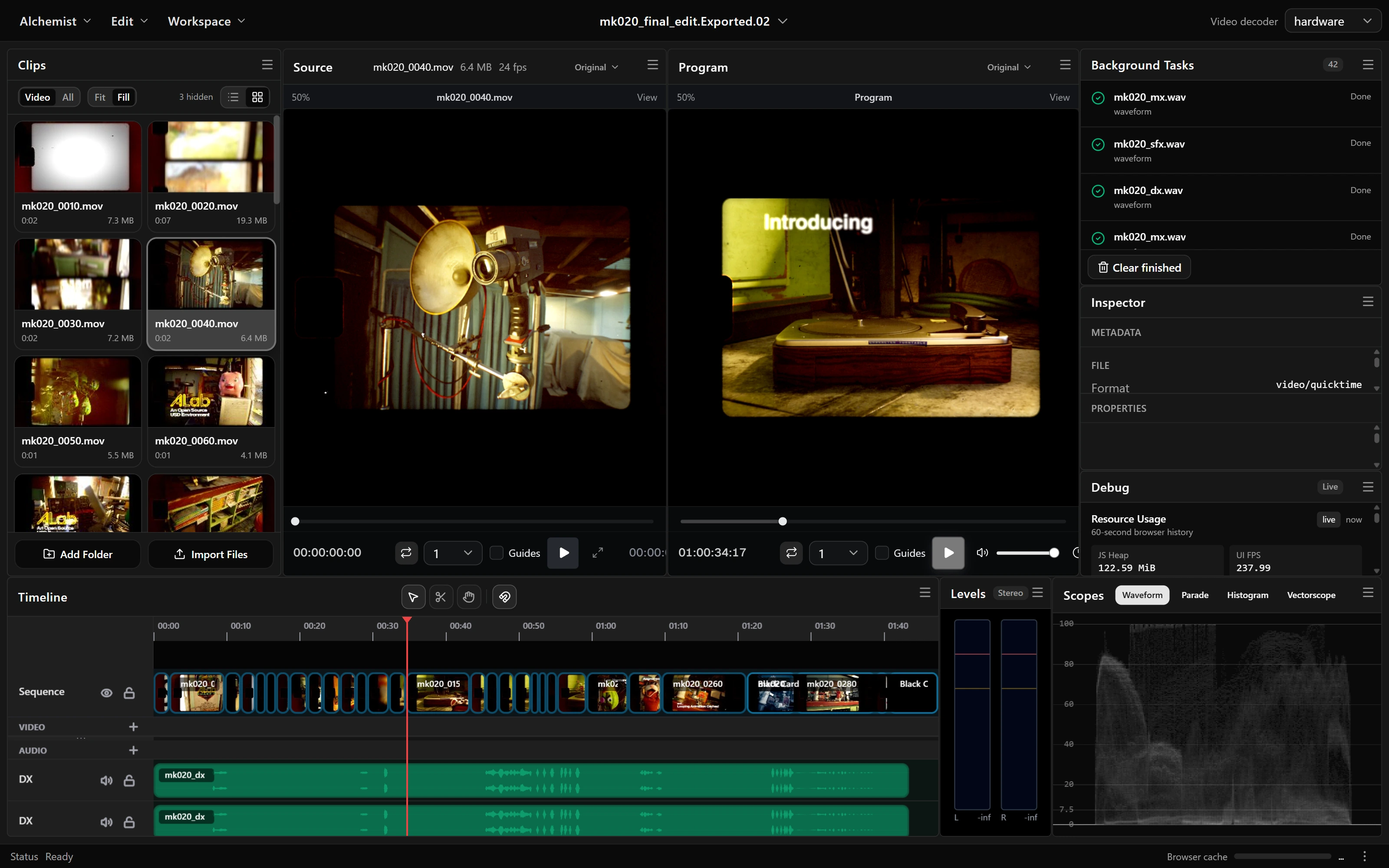
Panels live in a nested split tree with weighted children. Drag a header over another panel and a five-zone indicator offers an edge split or a straight swap — the same dock model as the desktop app.
Joins a live session
Open a session link and the browser becomes a review seat: the host's Program over WebRTC, the full timeline snapshot, the roster and the conference voice mesh.